Friday's Funny!
If our student's parents could hear the conversations that take place in our classroom, wouldn't they be shocked! Here is one from today:
Student: "Look at my nails, Mrs. ????. My mommy painted all of them and she put crackle on it."
Teacher: "Those are very pretty and your mommy is very talented. Do you think she would come in and do mine?"
Student: "I bet she would because she is the Crack Queen."
You gotta love what they say.
Happy Friday!
Ann

A place to share ideas and thoughts about teaching kinders
Friday, November 18, 2011

Wednesday, November 16, 2011
What in the world are QR Codes?

I bet you have seen these around everywhere lately.

This is a QR code. I really didn't pay much attention to them until this afternoon.
I mentioned in my last blog that I work at a school that is using a great amount of Apple equipment. In addition to all this wonderful equipment, we have a group of teachers who meet once a week (on our own time) to discuss new and innovative ways to use this technology in the classroom. Well today, I learned how to make my own QR code.
Now I know what you are thinking! How can this be useful in kindergarten? Especially when the kids can't read yet and it wouldn't be feasible for the teacher to be walking around all day reading everyone's scanners. Well, the neat thing is that when you create your own QR code...you can type in ANYTHING.
So, my brain got thinking...what CAN my kinders read? Sight Words! Color Words! Number Words! Numbers! Letters of the alphabet! Names! So there began my "AH HA" moment on how I can use this amazing new technology!
Yes, there I was, incredibly excited about inputting our 31 District Based Sight Words into the QR Code Generator so that I could create codes just like the one above. I am going to place these codes in various locations around my room for my students to scan with their iTouches (Think of it as a "Techy's" version of read around the classroom).
If you are interested in how to create your own QR codes to use in your classroom, just click here. It is amazing how technology keeps creating new ways for us to teach our students. Don't forget to download a QR scanner app on your phone, iPad, or iTouch to complete this activity.
Let me know if you try this. I would love to hear from you!
Respectfully,
Ann
Monday, November 14, 2011
Got Apps?
Hello blogging friends! I was just wondering if any of my fellow bloggers out there use iPad's or iTouches in the classroom. If so...do you have any favorite apps?
Last year one of our wonderful teachers wrote a grant to the Apple Corporation and our school benefited greatly! Our school and several other schools in the area received $750,000 worth of Apple Technology to use in the classroom. In kindergarten, we all have one MacBook, one iPad and four iTouches. I am currently learning how to use this AWESOME technology and trying to find the most effective way to use it in the classroom. I have found that I can use the four iTouches as a work station and I am currently using the iPad during whole group and small group instruction. Also, the kids will do JUST ABOUT ANYTHING to use the iPad so I use it as a reward on those "special" occasions. The MacBook is mostly used as a charging station and another computer with internet capability.
Anyway... here are a few of my favorite apps:
1. Little Speller 3 Letters/Little Reader 3 Letters (made by Grasshopper Apps)
2. Letter of the Day (made by Lakeshore and is free until December)
3. Sound Sorting (made by Lakeshore and is free until December)
4. Candy Count (made by Camigo Media and it is free...there is another version you can pay for that is just as awesome)
5. Howie Hungry Monster (Build Words) (made by PlaySmart)
I would love to hear from you about your favorite apps. Most of the ones that I listed are free, but I am more than willing to pay for an app if it is great to use with my kindergarten students.
Thanks for visiting my little blog. I am a newbie in the blogging world and I get so excited when I see new faces following me. It makes me feel special! :)
Happy Blogging!!!
Thursday, November 10, 2011
A Thought For Thursday!
I just thought I would drop a line before school and then my family heads to the "Most Magical Place on Earth" for the weekend...yes, we live close to Disney World and sometimes I think we go WAY too often, but my kids love it.
Anyway...over the years I am sure all of you have collected a vast number of pictures that go along with your Letter of the Week instruction. I use to spend a large amount of time on my Friday afternoon, recreated a bulletin board to display all of these wonderful pictures. Well one day I had an epiphany! Why not just glue all of those picture to a permanent display? Not only would it save time for me, but it would free up a bulletin board for another valuable teaching display!
So, here is what my Letter Focus boards look like...

They are great to put at my writing center for the children to refer to when writing sentences.
I hope you can use this idea or it helps you to have an epiphany of your own!
Enjoy!
Tuesday, November 8, 2011
TERRIFIC TWO'S DAY!
Thanksgiving is right around the corner and some of my favorite bloggers have shared some TERRIFIC ideas to use with your kinders. If you haven't seen them yet, here are two of my favorites for your Tuesday viewing...


Thanksgiving is right around the corner and some of my favorite bloggers have shared some TERRIFIC ideas to use with your kinders. If you haven't seen them yet, here are two of my favorites for your Tuesday viewing...
#1 Tammy from Live, Love, Laugh Everyday in Kindergarten has an awesome freebie that you will want for your writing center. It is a November Write the Room Packet. It includes some great picture word cards for your students to write sentences about Thanksgiving including what they are learning about Pilgrims and Indians. While you are there, check out her November Read and Write the Room freebies. They are wonderful too!
#2 Pam at Can Do Kinders has created some adorable Turkey Counting Mats using ten frames. Gobble them up while you can! Also, while you are there, check out her other Thanksgiving Freebies. Her Thanksgiving Write the Room activity is just as cute and is a great way to integrate writing and math. Thanks, Pam, for sharing such awesome ideas.
Well, that's it! That is the top two for Tuesday. It could have been a top twenty, but I have other duties calling my name (cook dinner, help the kids with their homework, laundry, you know the drill!).
Until next time...
Monday, November 7, 2011
Interactive Charts Anyone?


I don't know if anyone even calls them that anymore?
Years ago (I am not going to say how many)...when I was in college and immersed in the "Whole Language" format of teaching reading...I was introduced to the concept of making interactive charts to get the child more involved with the words they were reading. For some reason, this strategy stuck with me all of these years and now I have accumulated quite a collection that I use with my kindergarten students.
I model using these charts with my whole class several times before I place them at the interactive chart center for them to use independently. What makes them interactive? Many of the charts have something that the child can manipulate such as adding a name, changing a number, or counters. All of the items that are manipulated on the chart have velcro on the back.
Here are a few that are currently hanging at my Interactive Chart Center:
The Birthday Song

On the birthday song chart, the children can manipulate the number of candles (I use to teach Pre-K for 3 and 4 year olds) and attach the name of the child they are singing to at the appropriate place. This one stays out all year as we use it on every child's birthday. They just love being teacher on their birthday while wearing a birthday crown and using the special birthday pointer too.
Farmer Brown

The children can manipulate the number at the top as they pull off the apples.
Way Up High In The Apple Tree

On this chart, the children can manipulate the apples on the tree as they read the rhyme. If I were to redo this one, I would have made it so that you can change the number at the top as well.
Pick A Pumpkin

For this rhyme, the children can pick the pumpkins at the bottom. When I do this chart, we also write down subtraction sentences (5-2=3, 3-2=1, so forth). If I were to ever redo this chart, I would add a lot more pumpkins so that we can do more subtraction sentences.
Pumpkin Face

For this rhyme, the children can manipulate the shapes at the bottom to give the pumpkin a face. I tell them they can use any of the objects to create a face in any way they want. They love seeing what the Jack-o-lanterns face looks like when they are done. As I use this whole group, I ask the children to tell me what shapes they used for the eyes, the nose, and the mouth. This is great for reviewing shapes at Halloween time.
Leaves Falling Down

The students can manipulate the colored leaves to retell this rhyme. This is great for reviewing color words.
The Leaves are Falling Down
(tune: The Farmer In the Dell)

Again, the children simply manipulate the colored leaves on this rhyme to then retell it in their way.
Ten Little Indians

For this chart, the children can manipulate the indians at the bottom. We practice putting them up as we count from one to 10. We also can put them in a pattern (boy, girl, boy, girl, etc.). I have considered writing numbers on the indians and having the children put them in number order. I just haven't done it yet.
So is anyone wondering, how do you store all of these charts. Well, here is a picture of what the center looks like. My husband built it for me years ago. I don't know if you can see it, but it has a white hook on the end of it for the children to hang the chart they are working with. Sometimes they like to take the chart over to my easel to use, since that is where I model using the charts with them. All of the charts are hanging on plastic hangers.
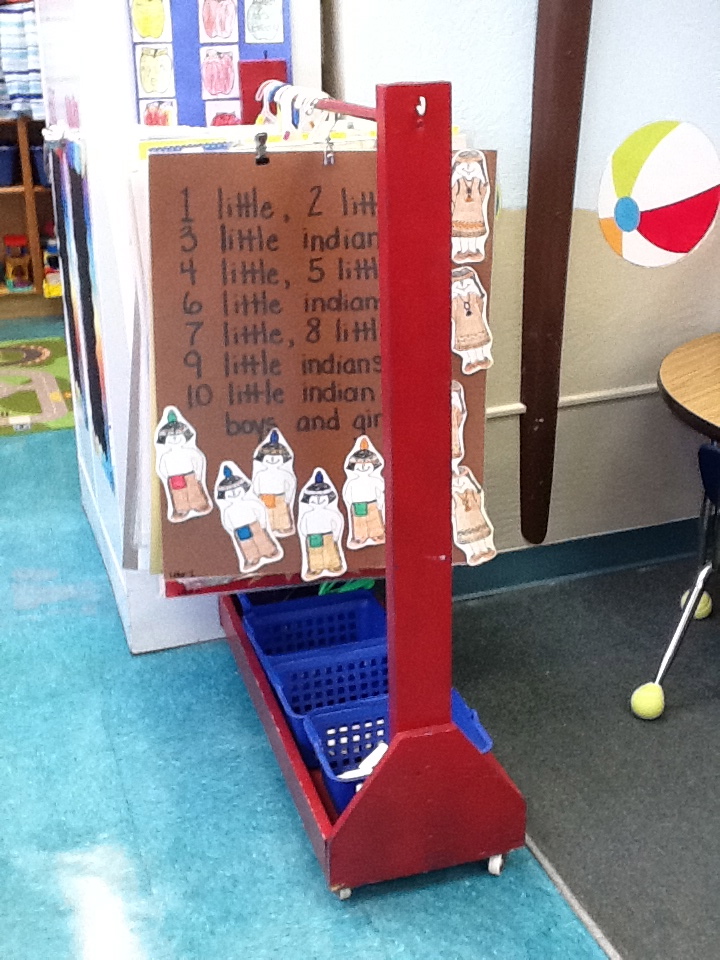
Any charts that are not in use are stored in a coat closet. We are an older school and I actually still have a coat closest in my classroom. I have many interactive charts that go with various literature as well (The Very Hungry Caterpillar, The Napping House, The Bus Ride, I Know An Old Lady Who Swallowed A Fly).
I am always looking for new interactive chart ideas, so if you know of any, please share.
Happy Blogging!
Sunday, November 6, 2011
Okay...so it has been quite some time since I have shared one of my own ideas, so I thought maybe I should do my part.


Our fabulous First Grade team of teachers decided to implement a new project with their students this school year for Halloween and it turned out to be a hit. The students were asked to decorate a pumpkin like their favorite storybook character. They had to bring the book and their finished pumpkin to school the week prior to Halloween. All of the pumpkins were displayed in the media center and the entire school voted on their favorites. The finished products were absolutely adorable. Some of our favorites were Nemo, Hello Kitty, SpongeBob Squarepants, Spiderman, and The Cat in the Hat. Here is a few pictures of my daughter (who is in first grade creating her Storybook Character Pumpkin).
Abby Painting her pumpkin...

Abby painting the face of The Cat in the Hat...

We painted whiskers, ears, and a bow...


The final product (without the hat...it was stored in a bin in my classroom).

Here is the final product on display in our school's media center. I am so proud of my little Abby. She did an awesome job.

Like I said, this was a great and fun project for the first graders. You may want to try this next year.
Happy Pumpkin Designing!
Subscribe to:
Posts (Atom)